你的 AI Agent 擁有的 SSH 權力太大了! 趕快收回以免一切都晚了
What is GPG Subkey?
在 GPG 與 YubiKey 的相遇之旅 | Shawn Hsu 裡面,我們在產私鑰的時候
將 ECSA 四種不同用途的 key 分開產生,最後得到一把 Primary Key 以及 兩把 Subkey
1
2
3
4
5
6
7
8
9
10
11
12
13
$ gpg --with-subkey-fingerprint --list-secret-keys 7C4FA560330319BC5404972D7AD157320911F131
sec>  rsa4096 2022-03-11 [SC]
      7C4FA560330319BC5404972D7AD157320911F131
      Card serial no. = 0006 18319649
uid           [ unknown] Shawn Hsu <shawn.hsu@bigstack.co>
uid           [ unknown] Shawn Hsu <ambersun1019.shawn@gmail.com>
uid           [ unknown] Shawn Hsu <shawn.hsu@lkc-lab.com>
ssb>  rsa4096 2022-03-11 [E]
      5A0C416DDC64CB6254B316184C3E6492E75EEEBD
      Card serial no. = 0006 18319649
ssb>  rsa4096 2022-03-11 [A]
      923CDEE811D9F05FC77727F114D25549BA2957CA
      Card serial no. = 0006 18319649
GPG Key Capabilities
稍微複習一下,GPG Key 可以分成四種用途
(E)ncrypt: 用於加解密(A)uthenticate: 身份驗證,常用於 SSH 登入(S)ign: 數位簽章(C)ertify: 憑證授權,用於驗證並管理底下的 Subkey
其中 (C)ertify 是 Primary Key 才有的,僅此一隻
(S)ign其實也可以獨立出來成為一把 Subkey 不過我當初沒這麼做
那麼分成多把 Subkey 有什麼好處呢?
其中最明顯的是 風險隔離
如果其中一把 Subkey 被破解或洩漏,只要把它 revoke 掉,就可以避免被濫用
Primary Key 絲毫不會有任何影響
再來是 職責分離
不同的 Subkey 有自己獨立的職責,負責加解密的只負責加解密,負責身份驗證的只負責身份驗證
How to Know it’s Using Different Subkey?
寫是這樣寫,但是我要怎麼知道在使用的時候,他真的是呼叫不同 Subkey 的
Primary Key(Signing Key)
先測試一下 Primary Key 簽署是用哪一把,因為我的 S(Sign) 是綁在 Primary Key 上的
所以可以預期他應該會使用 Primary Key 來簽署
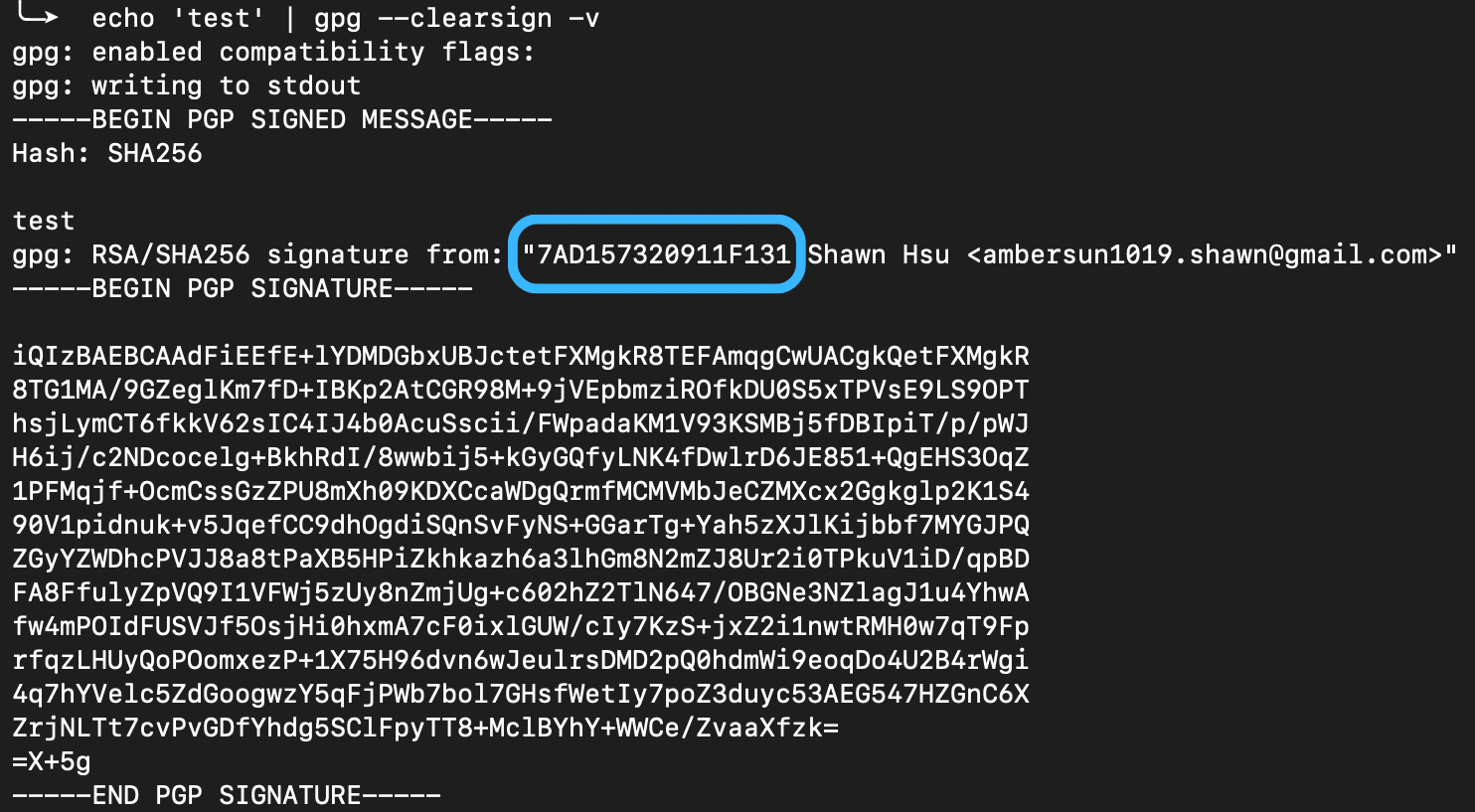
可以看到,的確是使用我的 7C4FA560330319BC5404972D7AD157320911F131 這把 Primary Key 來簽署的
Subkey(Authenticate)
再來測試一下 Subkey,這邊我用 SSH 登入來進行測試
首先要先知道我的 A(Authenticate) 是綁在哪一把 Subkey 上的
簡單觀察可以看到有三個區塊
scESCA: Primary Key(藍色區塊)e: Encrypt Subkey(紫色區塊)a: Authenticate Subkey(黃色區塊)

那因為 GPG Key 沒辦法直接轉換成 SSH Key,所以要稍微計算一下

然後再來實際測試一下
1
$ ssh -vT git@github.com

可以看到計算出來的結果的確是用來 SSH Authenticate 的
到這裡我們就確認的確是使用 Subkey
SubKey Specifically for AI Agents
你想哦,如果你跟我一樣是用 Yubikey,所有權限、金鑰等等都在同一隻上面
如果把相當的權限交給 AI Agent 進行操作
其實你的權限會給得太高
所以我就在想,有沒有一種辦法可以給比較限制的權限讓 AI Agent 進行操作
並且,如果是 24 小時運作的 Agent 我也不可能 Yubikey 隨時接著,這樣就喪失了使用實體金鑰的意義
Standalone SubKey
SubKey 一定要存在於 Yubikey 裡面嗎? 不
他其實可以是 standalone 的,在 GPG 與 YubiKey 的相遇之旅 | Shawn Hsu 裡面我們先是在本機將 key 產出來
真正進到實體金鑰裡面是透過 keytocard 指令寫入的
換句話說,你可以不寫
反正我們本來的目的就是不接實體金鑰,限縮權限
你產出的 SubKey 也是跟 Yubikey 的 primary key 有關聯的
前面提到 Primary Key 管控著所有 SubKey,在我們的例子也很有幫助
如果真的讓 AI Agent 拿去濫用,簡單的 revoke 即可
Generate Subkey For AI Agent
我其實原本想要在同一隻 GitHub 帳號底下開不同權限的 SSH 與 GPG key
但我後來馬上打消這種想法
原因是我給 Claude Code 滿大的權限
那老實說我其實滿害怕的 看到他能夠直接操作其他 app 與系統
我覺得還是開在相同帳號下其實還滿危險的
所以我後來選擇開一隻新的 GitHub 帳號
這隻新的帳號就是用 Subkey
至少我能夠限制他可以存取的東西
Add Signin Key
1
2
3
4
5
6
7
8
9
10
11
12
13
14
15
16
17
18
19
20
21
22
23
24
25
26
27
28
29
30
31
$ gpg --expert --edit-key 7C4FA560330319BC5404972D7AD157320911F131
gpg> addkey
Secret parts of primary key are stored on-card.
Please select what kind of key you want:
   (3) DSA (sign only)
   (4) RSA (sign only)
   (5) Elgamal (encrypt only)
   (6) RSA (encrypt only)
  (10) ECC (sign only)
  (12) ECC (encrypt only)
  (14) Existing key from card
Your selection? 4
RSA keys may be between 1024 and 4096 bits long.
What keysize do you want? (3072) 4096
Requested keysize is 4096 bits
Please specify how long the key should be valid.
         0 = key does not expire
      <n>  = key expires in n days
      <n>w = key expires in n weeks
      <n>m = key expires in n months
      <n>y = key expires in n years
Key is valid for? (0) 0
Key does not expire at all
Is this correct? (y/N) y
Really create? (y/N) y
We need to generate a lot of random bytes. It is a good idea to perform
some other action (type on the keyboard, move the mouse, utilize the
disks) during the prime generation; this gives the random number
generator a better chance to gain enough entropy.

gpg> save
然後請記住你 subkey 的密碼
Add Authenticate Key
1
2
3
4
5
6
7
8
9
10
11
12
13
14
15
16
17
18
19
20
21
22
23
24
25
26
27
28
29
30
31
32
33
34
35
36
37
38
39
40
41
42
43
44
45
46
47
48
49
50
51
52
53
54
55
56
57
58
59
60
61
62
63
64
65
66
67
68
69
70
71
72
73
74
gpg> addkey
Secret parts of primary key are stored on-card.
Please select what kind of key you want:
   (3) DSA (sign only)
   (4) RSA (sign only)
   (5) Elgamal (encrypt only)
   (6) RSA (encrypt only)
   (7) DSA (set your own capabilities)
   (8) RSA (set your own capabilities)
  (10) ECC (sign only)
  (11) ECC (set your own capabilities)
  (12) ECC (encrypt only)
  (13) Existing key
  (14) Existing key from card
Your selection? 8

Possible actions for this RSA key: Sign Encrypt Authenticate
Current allowed actions: Sign Encrypt

   (S) Toggle the sign capability
   (E) Toggle the encrypt capability
   (A) Toggle the authenticate capability
   (Q) Finished

Your selection? A

Possible actions for this RSA key: Sign Encrypt Authenticate
Current allowed actions: Sign Encrypt Authenticate

   (S) Toggle the sign capability
   (E) Toggle the encrypt capability
   (A) Toggle the authenticate capability
   (Q) Finished

Your selection? S

Possible actions for this RSA key: Sign Encrypt Authenticate
Current allowed actions: Encrypt Authenticate

   (S) Toggle the sign capability
   (E) Toggle the encrypt capability
   (A) Toggle the authenticate capability
   (Q) Finished

Your selection? E

Possible actions for this RSA key: Sign Encrypt Authenticate
Current allowed actions: Authenticate

   (S) Toggle the sign capability
   (E) Toggle the encrypt capability
   (A) Toggle the authenticate capability
   (Q) Finished

Your selection? Q
RSA keys may be between 1024 and 4096 bits long.
What keysize do you want? (3072) 4096
Requested keysize is 4096 bits
Please specify how long the key should be valid.
         0 = key does not expire
      <n>  = key expires in n days
      <n>w = key expires in n weeks
      <n>m = key expires in n months
      <n>y = key expires in n years
Key is valid for? (0) 0
Key does not expire at all
Is this correct? (y/N) y
Really create? (y/N) y
We need to generate a lot of random bytes. It is a good idea to perform
some other action (type on the keyboard, move the mouse, utilize the
disks) during the prime generation; this gives the random number
generator a better chance to gain enough entropy.

gpg> save
然後請記住你 subkey 的密碼
Don’t Move to Key
我們要的目的是,讓 AI Agent 使用權限相對較小的 subkey 自動操作
當初用 gpg> keytocard 的原因是我要把主 key 放在 Yubikey 裡面
可是現在又把它放進去顯然不是我們要的,所以千萬別這樣做
1
2
3
4
5
6
7
8
9
10
11
12
13
14
15
16
17
$ gpg --with-subkey-fingerprint --list-secret-keys 7C4FA560330319BC5404972D7AD157320911F131
sec>  rsa4096 2022-03-11 [SC]
      7C4FA560330319BC5404972D7AD157320911F131
      Card serial no. = 0006 18319649
uid           [ unknown] Shawn Hsu <shawn.hsu@bigstack.co>
uid           [ unknown] Shawn Hsu <ambersun1019.shawn@gmail.com>
uid           [ unknown] Shawn Hsu <shawn.hsu@lkc-lab.com>
ssb>  rsa4096 2022-03-11 [E]
      5A0C416DDC64CB6254B316184C3E6492E75EEEBD
      Card serial no. = 0006 18319649
ssb>  rsa4096 2022-03-11 [A]
      923CDEE811D9F05FC77727F114D25549BA2957CA
      Card serial no. = 0006 18319649
ssb   rsa4096 2026-09-15 [S]
      2381D24710823C0B0D34467EF254DB8EBA368426
ssb   rsa4096 2026-09-15 [A]
      66F7C07B6B3AB9F6ADACFEE53B3F51E129BE771C
所以你跑完最後那兩個就是新的 Signin Key 以及 Authenticate Key
1
2
3
4
5
6
7
8
9
10
11
12
13
14
15
16
17
$ gpg --list-secret-keys --with-subkey-fingerprints
[keyboxd]
---------
sec>  rsa4096 2022-03-11 [SC]
      7C4FA560330319BC5404972D7AD157320911F131
      Card serial no. = 0006 18319649
uid           [ unknown] Shawn Hsu <ambersun1019.shawn@gmail.com>
ssb>  rsa4096 2022-03-11 [E]
      5A0C416DDC64CB6254B316184C3E6492E75EEEBD
      Card serial no. = 0006 18319649
ssb>  rsa4096 2022-03-11 [A]
      923CDEE811D9F05FC77727F114D25549BA2957CA
      Card serial no. = 0006 18319649
ssb   rsa4096 2026-09-15 [S]
      2381D24710823C0B0D34467EF254DB8EBA368426
ssb   rsa4096 2026-09-15 [A]
      66F7C07B6B3AB9F6ADACFEE53B3F51E129BE771C
所以你就有看到新的兩把 key 出現在最下面這樣
而且你有發現到說 ssb 跟 ssb> 的差別嗎?
重點在於說,有 > 的這個是代表私鑰不在本機,以我的例子來說,是在 Yubikey 上面
Prepare Keys
所以現在要把新產的 S 以及 A key
遷到 AI Agent 正在執行的電腦上面
1
$ gpg --armor --export-secret-keys 2381D24710823C0B0D34467EF254DB8EBA368426 > ai-agent-signing.asc
2381D24710823C0B0D34467EF254DB8EBA368426 是 Signing Subkey
用它 export 出來的東西就是你的私鑰
1
2
$ gpg --armor --export 2381D24710823C0B0D34467EF254DB8EBA368426 > ai-agent-gpg
$ gpg --export-ssh-key 66F7C07B6B3AB9F6ADACFEE53B3F51E129BE771C > ai-agent-ssh.pub
所以這部分就是在處理 SSH 公鑰跟 GPG 指紋的部分
ai-agent-gpg以及ai-agent-ssh.pub這兩個就把它貼到 GitHub 上面
Test Subkey Working or not
然後最重要的步驟是
在新的電腦上,將私鑰進行匯入
1
$ gpg --import ai-agent-signing.asc
匯入之後你就測試一下 SSH 有沒有通
阿記得要把 ~/.gnupg/sshcontrol 裡面也新增 A subkey 的 keygrip(注意到! 是 keygrip)
以我的例子就是
1
2
3
$ cat ~/.gnupg/sshcontrol
7C4FA560330319BC5404972D7AD157320911F131
5DD2B7647A552C39443B16D5D59C6DC7CFE348A5
為什麼是兩個,一個是我個人用的主 key
另一個就是剛剛生成的 subkey(給 AI Agent 用的)
keygrip 怎麼拿?
1
2
3
4
5
6
7
8
9
10
11
12
13
14
15
16
$ gpg --with-keygrip --list-secret-keys 7C4FA560330319BC5404972D7AD157320911F131
sec>  rsa4096 2022-03-11 [SC]
      7C4FA560330319BC5404972D7AD157320911F131
      Keygrip = CEA5921433C0E89211E575AB21F89A7F0CF04A68
      Card serial no. = 0006 18319649
uid           [ unknown] Shawn Hsu <shawn.hsu@bigstack.co>
uid           [ unknown] Shawn Hsu <ambersun1019.shawn@gmail.com>
uid           [ unknown] Shawn Hsu <shawn.hsu@lkc-lab.com>
ssb>  rsa4096 2022-03-11 [E]
      Keygrip = 5A90C52AD008E0DDED9CAAC736C0667FBA13A49E
ssb>  rsa4096 2022-03-11 [A]
      Keygrip = 62416140A983C3FCC5B15A25CC36DB539D950A36
ssb   rsa4096 2026-09-15 [S]
      Keygrip = 3D41BB3FE5054409BAB67D355EBED76B52D41F98
ssb   rsa4096 2026-09-15 [A]
      Keygrip = 5DD2B7647A552C39443B16D5D59C6DC7CFE348A5
Sync to Keyserver
照慣例,我會把我的公鑰全數上傳到 keyserver.ubuntu.com
1
$ gpg --keyserver hkps://keyserver.ubuntu.com --send-keys 7C4FA560330319BC5404972D7AD157320911F131
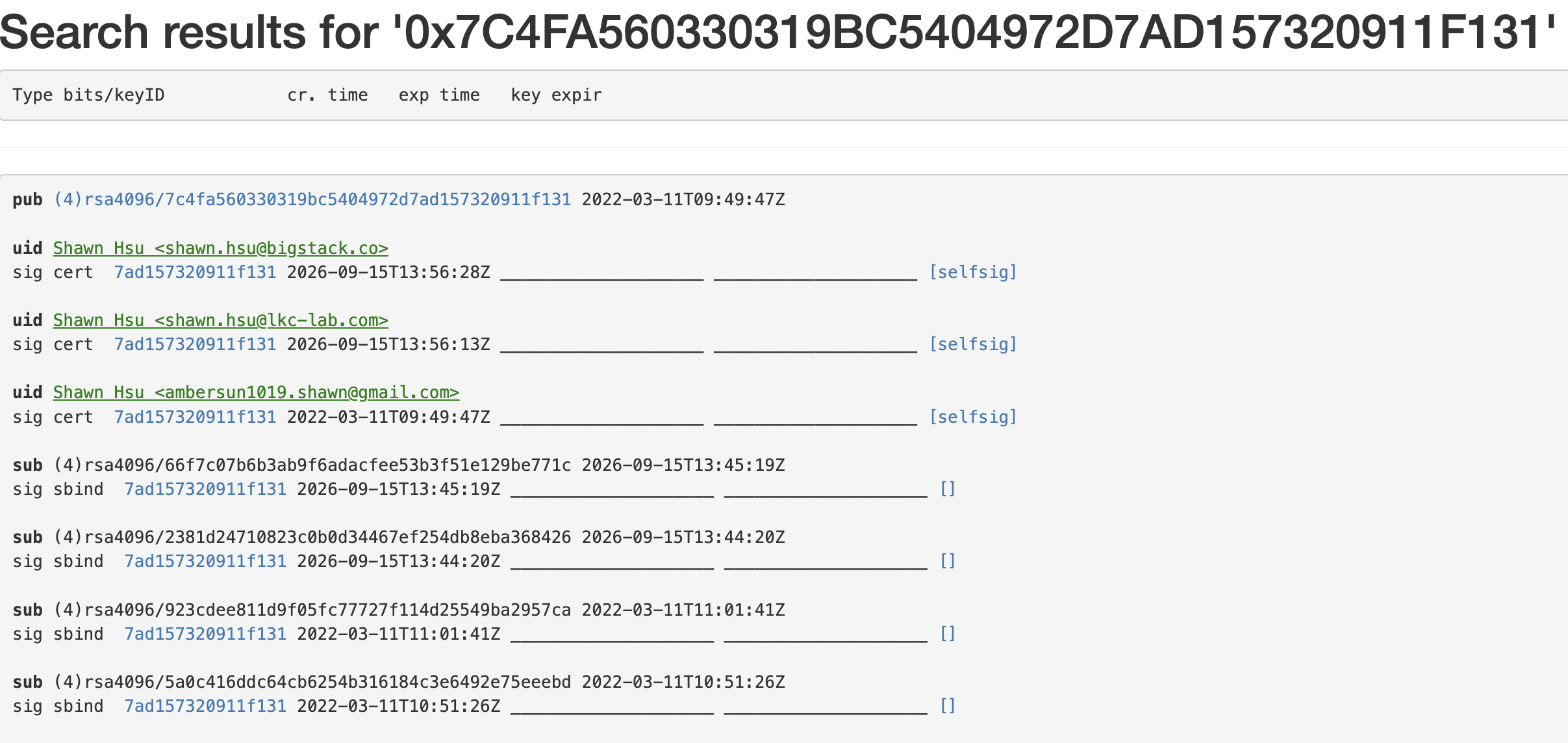
然後你就能看到 keyserver 上面已經有更新了
他大概要一點時間,他不會是馬上
Leave a comment